
PDM: Eindeutige Variable kann nicht geändert werden, da doppelte Werte existieren. Wie können die doppelten Werte ermittelt werden?
- Autor
- Volker H.
- Stand
- 26.10.2026
Dieser Fall kann folgendermaßen auftreten:
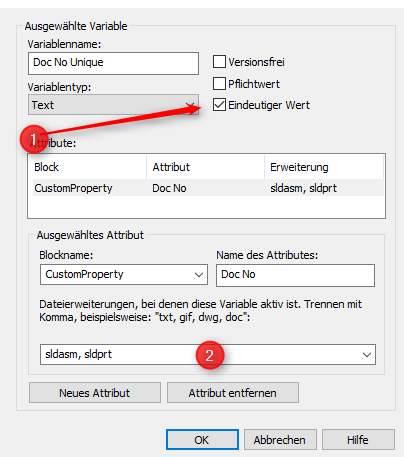
Die betreffende Variable ist auf „Eindeutiger Wert“ ① konfiguriert. Nun möchte man die Attribute der Variable verändern ②:
Nun erscheint die Meldung, dass die gewünschte Variable nicht geändert werden kann:
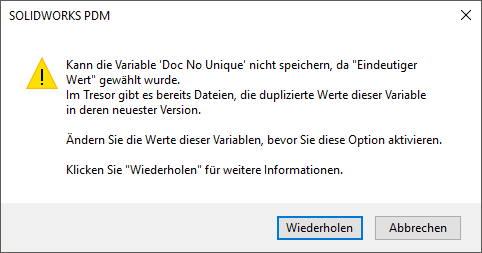
Die betroffenen Variablenwerte existieren lediglich in Dateien, die noch nicht eingecheckt sind. Beim Einchecken wird PDM die doppelten Werte erkennen und Löschen bzw. das Einchecken abbrechen.
Mit der nachstehenden SQL-Abfrage können die doppelte Werte ermittelt werden:
— SQL query to find all files where latest version has duplicate variable values in vault
— Updated to also check weldment and internal components
Declare @VarID Int
set @VarID = (Select VariableID from Variable where VariableName = ‘Doc No Unique’) –<< Update with variable name to check
— Find non-unique variable values (non-unique in the first 64 characters)
Select –Distinct
Case when o.ObjectTypeID != 1 then d.Filename else
(SELECT top 1 p.path + d.Filename
from Projects p, DocumentsInProjects dip
where p.ProjectID = dip.ProjectID
and dip.DocumentID = d.DocumentID
) end as [Filepath],
vv.DocumentID,
(Select VariableName from Variable where VariableID = @VarID) as [Variable],
Cast(vv.ValueText As nvarchar(max)) as [Value],
vv.RevisionNo as [Version],
(select ConfigurationName from DocumentConfiguration where ConfigurationID = vv.ConfigurationID) as [Configuration],
o.Description as [Type],
Case when o.ObjectTypeID = 1 then ‘-‘ else
(SELECT top 1 p.path + d2.Filename
from XRefs x
Join Documents d2 on d2.DocumentID = x.DocumentID
Join DocumentsInProjects dip On dip.DocumentID = d2.DocumentID
Join Projects p On p.ProjectID = dip.ProjectID
where XRefDocument = vv.DocumentID
) end as [Parent Filepath]
From VariableValue vv
–Join DocumentsInProjects dip On dip.DocumentID = vv.DocumentID
–Join Projects p On p.ProjectID = dip.ProjectID
Join Documents d On vv.DocumentID = d.DocumentID
Join ObjectType o On d.ObjectTypeID = o.ObjectTypeID
Where vv.VariableID = @VarID And
vv.ProjectID = 2 And
vv.RevisionNo = (Select Max(RevisionNo)
From VariableValue
Where VariableID = vv.VariableID And
DocumentID = vv.DocumentID And
ProjectID = 2 And
ConfigurationID = vv.ConfigurationID) And
vv.ValueCache <> ” And
vv.ValueCache <> ‘—‘ AND
vv.ValueCache <> ‘-x-‘ AND
d.Deleted = 0 And
Exists (Select 1
From VariableValue vv3
Join Documents d2 On d2.DocumentID = vv3.DocumentID
Where d2.Deleted = 0 And
vv3.DocumentID <> vv.DocumentID And
vv3.VariableID = vv.VariableID And
vv3.ProjectID = 2 And
vv3.RevisionNo = (Select Max(RevisionNo)
From VariableValue
Where DocumentID = vv3.DocumentID And
ProjectID = 2 And
ConfigurationID = vv3.ConfigurationID And
VariableID = vv3.VariableID) And
vv3.ValueCache <> ” And
vv3.ValueCache = vv.ValueCache)
Order by Value, Filepath